Michael Heilemann, The Norseman / The Viking - Field notes from the disk revival project: Apple II archiving
A single ADT Pro pass is a sample. Real evidence comes from repeated reads.
With the hardware chain from last time in place (the ][e, the SSC/seriALL card, the Floppy Emu standing in for a boot disk) it's tempting to treat "capture the disk" as a single, one-shot action. Put the floppy in the drive, run ADT Pro, get a .dsk file, move to the next disk. For a box of a few hundred disks, that's also the fastest way to end up with an archive full of silent corruption you won't discover until later, when you try to boot one of them.
-=[ WHY ONE READ IS A SAMPLE ]=-
A 5.25″ floppy disk stores data as magnetic flux transitions on a spinning disk, read by a head that has to be precisely aligned and clean, and pressed against the media at the right tension. It's all analog, and any of it can be marginal: good enough to work, usually. A slightly grungy head, a disk with one weak spot from decades of storage, a drive whose alignment has drifted a few thousandths of an inch, any of these can turn a specific sector into a coin flip. Read it now, get good data. Read it thirty seconds later, get garbage, or get a slightly different flavor of almost-good data.
A single capture pass only ever sees one outcome of that coin flip. It has no way to know it was marginal at all. The drive controller doesn't raise a flag that says "this one was iffy," it just hands back 256 bytes and moves on. That's the whole reason this pipeline treats a single .dsk capture as one data point.
-=[ THE TWO-DRIVE ADVANTAGE ]=-
This is where having a Disk II and a Cumana clone drive on separate controllers, from the last post, earns its keep. If a sector reads badly on the Disk II, and I then re-read the same physical disk on the Cumana drive and it comes back clean, that's much stronger evidence than re-reading it twice on the same drive. Two reads off the same drive share every possible systematic failure mode: the same head alignment, the same amount of dust, the same belt tension. Two reads off different drives don't share those failure modes at all, so agreement between them means something a same-drive re-read can't claim on its own.
In practice this shakes out as a triage pipeline more than a tiebreak. Standard capture goes first, and it goes on the Cumana, the drive that came with the system and the disks. Standard reads are also cheap: about 30 seconds a disk, against roughly 2 minutes for a Nibble scan, so around four times longer (both vary by run and by disk). That makes a standard capture cheap enough to batch five passes across a whole stack before moving on. A disk that reads clean across all of those passes is done. A disk that throws errors gets pulled into a separate pile for a pass on the Disk II, where I try to rectify the bad sectors against what the Cumana already captured. Anything still unresolved escalates from there, as the next section lays out.
-=[ THE ORDER OF READS: SPEED VS. THOROUGHNESS ]=-
The practical pipeline I've settled into treats read modes as a graduated escalation, not a simultaneous parallel approach. Speed matters when you're working through a large collection, and different read modes have very different time costs.
- Pile 1: Initial Standard Reads: I started with batch mode standard sector-by-sector captures on the original system's Cumana drive. Standard mode reads take about 30 seconds per disk, this is the quickest way to sample a whole stack of disks. Any disk that reads cleanly across five standard passes is shelved as done. If one read slowly or threw an error on a sector, I read it a total of 7 or 9 times, and put it into a separate pile.
- Pile 2: Problem Disks via Standard on the Disk II: Any disk that threw errors on the Cumana got moved to a separate pile for re-reading on the Disk II, still in standard mode. This gives a second independent drive a chance at sectors the Cumana struggled with. If the Disk II reads cleanly where the Cumana didn't, you now have more cross-referenced data for the consensus repair step later. If both drives fail on the same sectors, you have confirmation that it's a media problem, not a drive problem.
- Pile 3: Nibble Mode as Last Resort: Any disk that still shows unrecoverable errors after standard reads on both drives gets moved to a third pile for nibble-mode batch reading. Nibble mode takes just over 2 minutes per disk on average (four times longer than standard), so keeping this pile as small as possible matters. Nibble reads attempt to capture protected disks or to recover the raw nibbles of each track, which can reveal why a disk failed in standard mode (a non-standard format rather than damage). Both drives get tried again here, with the Cumana as primary.
- Pile 4: Specialized Hardware: If nibble mode still can't produce a readable image, that disk moves to specialized hardware like an Applesauce, a KryoFlux or a Greaseweazle. At this point you've already gathered independent evidence that the disk itself is the limiting factor, not your drive chain.
The reason for this order: speed and evidence build together. Standard mode is fast enough to get multiple independent reads through quickly, which gives you cross-referencing data before the disk degrades any further. By the time you're running nibble mode, you already know the disk is trouble, and you're only spending the extra time on the disks that need it. Nibble mode still reads the whole disk, so it's the disk that gets selected, not the sectors.
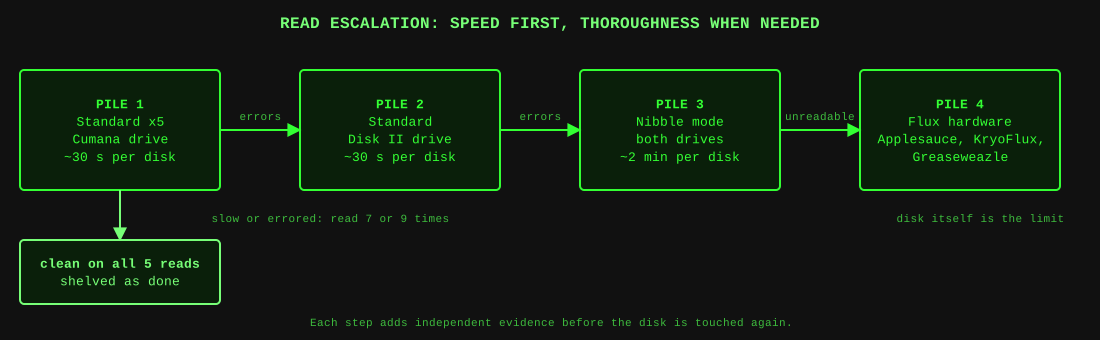
The four piles. A disk only moves right when the one before it could not settle the question.
-=[ WHAT "READING IT MORE THAN ONCE" BUYS YOU DOWNSTREAM ]=-
The reason for an odd number of reads is pretty obvious: it gives you a best of X (2/3, 3/5, 4/7, 5/9) with no ties when it comes to the consensus repair step later. (The caveat, covered in Part 7: a read that outright fails drops out of the vote, so the no-ties guarantee only holds when every read came back clean. It's still the right habit.)
It's the raw material the consensus repair step later in this series depends on entirely. Merging multiple re-reads by majority vote (more on that in Part 7) only works if you captured more than one independent read to vote between. Skip this step at capture time, and there's no reconstructing it later.
So the practical rule I've settled into: every disk that isn't a known-pristine, recently verified copy gets captured at least five times, on two different drives where possible. A disk that shows any sign of trouble on the first pass (a slow read, an error message from ADT Pro) gets a seventh or ninth pass without hesitation. Disk imaging time is relatively cheap.
What this is not: this isn't flux-level imaging. A tool like Applesauce or a KryoFlux captures the raw magnetic flux transitions themselves, which lets it see and retry at a level below "decoded sector," and can do meaningfully better than what's described here. That hardware wasn't in budget for this project, and for the bulk of an unprotected software collection, calibrated multi-read capture at the sector level gets you most of the practical benefit for a fraction of the cost. I'll come back to exactly where that ceiling sits in Part 9, on protected disks and limits.
-=[ NAMING DISCIPLINE, OR THE LACK OF IT ]=-
One thing worth flagging now because it saves real pain later. When capturing, I use batch mode, and name the disk based on the physical disk label so if it looks like it read properly, but when I test it there are problems, I can find the disk much more easily and retry with another method like Nibble, or specialized hardware.
Naming and timing matter for a second reason, which I'll come back to in Part 7. ADT Pro's batch mode appends a four-digit counter to each capture's name, and the program strips that counter and any punctuation to work out which files are re-reads of the same disk. It also uses each file's modification time, since re-reads of one disk land next to each other in capture order. So don't rename, re-save or reshuffle captures in the middle of a session. One more thing to know: ADT Pro's virtual drive server drops Virtual.po files in the folder it runs from. They aren't captures, and the program deletes them from a collection it scans.
-=[ WHAT THE CAPTURES LOOKED LIKE ]=-
Here is what that habit produced on the latest full run through the collection. The capture folder turned out to hold 183 distinct disks, and 61 of them were rebuilt by voting between several reads. Part 7 has the numbers on what those extra reads were worth.
Next up: we finally leave the hardware behind and get into the filesystem itself. What does it mean to validate a DOS 3.3 disk the way DOS 3.3 would: the VTOC, the catalog, and the track/sector chains that hold every file together?
Prepare ye to plunder,
Michael Heilemann - The Norseman/The Viking