Michael Heilemann, The Norseman / The Viking - Field notes from the disk revival project: Apple II archiving
A DOS 3.3 disk image is 143,360 bytes sitting in a row: 35 tracks of 16 sectors of 256 bytes each. Nothing about that raw layout tells you whether it's a working disk. To know that, you have to read it the way DOS 3.3 itself would: start at a fixed location, follow the same pointers DOS follows, and ask the same questions DOS asks before it hands you a file. This post is about building exactly that reader.
Everything below is written for 16-sector disks. DOS 3.2 and its 13-sector floppies, from before DOS 3.3 changed the encoding, use the same VTOC, catalog and track/sector list structure with 13 sectors a track (a 116,480-byte image), and the program reads them with the same walk, run against 13 sectors. Part 9 covers what that took.
-=[ THE BOOT RECORD ]=-
Before diving into the filesystem, we check track 0, sector 0: the boot record. The first byte is the number of sectors the BOOT0 code in the controller card's firmware will read in before jumping to it. That code doesn't understand sector skewing, so reading anything other than the one sector it just loaded would be asking for trouble, which is why the byte is almost always 0x01 (strictly speaking it doesn't have to be). It isn't a "bootable" flag, but a stock value is still a good first hint. It's not the only thing the pipeline looks at: a completely blank sector 0 means a data disk with no boot code, and a sector 0 that doesn't start with 0x01 but is clearly 6502 machine code is treated as a custom loader, not a data disk.
For DOS 3.3 there's no signature to search for. A stock DOS 3.3 boot sector only contains enough code to load the rest of its own bootstrap from sectors 1 to 9 of track 0, so a boot sector that looks fine on its own, with those supporting sectors blank, won't get anywhere. The pipeline counts how many of the nine have content: all nine is "Bootable," some is "Bootable custom/protected" (a partial or hybrid loader), none is "Unknown." Only ProDOS has a real signature: five bytes at the start of block 0 (01 38 B0 03 4C) followed by a jump whose target has to land inside the $0800 to $09FF window the block is loaded into. Custom or copy-protected boot sectors won't match either, and that's useful information in itself. A disk with a non-standard boot sector is either intentionally protected, heavily modified by the original developer, or corrupted. Knowing which one matters for understanding how to handle the rest of the disk.
One caveat: all of this is static inspection, and "Bootable" really means "the boot structure looks stock." There's plenty of room in sector 0 for custom code, so the rest of track 0 may be in a non-standard format that none of these checks can vouch for. The only way to know for sure that a disk works is to boot it, which is why the pipeline also launches disks in an emulator and captures the screen.
-=[ THE VOLUME TABLE OF CONTENTS (VTOC) ]=-
Track 17, sector 0 is always the Volume Table of Contents (VTOC) and serves as the root of the DOS 3.3 filesystem. Track 17 was chosen because it sits at the center of a 35-track disk. Placing the VTOC there minimizes the average seek distance, since the disk head never has to move more than halfway across the disk to reach any data track.
Before trusting anything else about the disk, this pipeline checks the VTOC's own header fields: does it declare 256 bytes per sector, and 122 as the maximum track/sector pairs per T/S list sector? Every offset calculation for the rest of the disk implicitly assumes them. A VTOC that disagrees with those standard values means either real corruption in the VTOC itself, or a non-standard DOS variant this pipeline can't safely interpret using fixed-offset math. Either way, that's good to know before parsing the data.
Here's the check. Note what it does when the header disagrees: it reports a problem and keeps going. A bad VTOC header makes the disk SUSPECT rather than automatically BAD, because a non-standard DOS variant is a real possibility and the rest of the checks are still informative.
def dos33_vtoc_header_problems(vtoc):
    problems = []
    bytes_per_sector = vtoc[0x36] | (vtoc[0x37] << 8)
    if bytes_per_sector != 256:
        problems.append(f"VTOC declares {bytes_per_sector} bytes/sector "
                         "instead of the standard 256")
    max_tsl_pairs = vtoc[0x27]
    if max_tsl_pairs != 122:
        problems.append(f"VTOC declares {max_tsl_pairs} max T/S pairs "
                         "per sector (expected 122)")
    return problems
Those two fields are not the only ones Beneath Apple DOS documents in the VTOC, and a second pass reads the rest. Byte $30 holds the last track DOS allocated from and byte $31 the direction it was moving, $01 for up or $FF for down. DOS adds the direction to the track number, so a last track off the 35-track disk or any other direction byte sends the next file's allocation somewhere wild. That is harmless to a read-only dump and fatal to the next SAVE, so it's reported as a soft problem. Three more oddities only earn a note: a release byte other than 3, a volume number outside 1 to 254, and non-zero spare bytes after a track's bitmap word (DOS ignores them and never writes them). A real collection told me where to stop. Of 45 DOS 3.3 disks in my test set, none tripped the allocator check and one carried a release byte of 1, so a note is the right weight for that one.
-=[ WALKING THE CATALOG CHAIN ]=-
The VTOC hands off a track/sector pointer to the first catalog sector, and from there the catalog is a linked chain: each sector points to the next, seven directory entries per sector, until a sector points to (0, 0) to mark the end. That linked-chain structure is exactly the kind of thing that goes wrong on damaged media. A bad read can turn a chain terminator into a bogus pointer, or worse, into a pointer that loops back on itself and hangs a naive reader forever.
So the walk here does two things a lot of quick-and-dirty catalog readers skip: it bounds every step against the disk's actual geometry before following it (a pointer to track 40 on a 35-track disk gets flagged immediately, not chased), and it tracks every sector it's already visited so a loop gets caught and reported instead of spinning forever.
Each entry that survives that walk gets a few more sanity checks: is the filename plausible, is the type byte one of the eight DOS 3.3 recognizes, is the claimed sector count something that could plausibly fit on a 560-sector disk. The name check isn't "printable ASCII." Apple II names normally have the high bit set on every byte, but a name with it clear on every byte displays as inverse or flashing text, a common cracker banner like >>>>>>>> BAG OF TRICKS <<<<<<<<, and that's just as deliberate. Random garbage mixes the two about half and half, and that mix is what gets counted as bad. Individually these are minor checks. Together, they're the difference between "this looks like a normal, if damaged, DOS 3.3 catalog" and "this looks deliberately scrambled," which matters, because a heavily protected or modified-DOS disk can look catastrophically "corrupted" by these checks while being completely intentional. Only when at least two entries, and more than 15% of them, fail does the pipeline decide this is a modified DOS or a protection scheme rather than a damaged catalog. At that point it stops walking files, relabels the disk "DOS-3.3-shaped but non-standard catalog," and notes why, rather than flagging every copy-protected game in the collection as BAD. More on that distinction in Part 9.
-=[ FOLLOWING EVERY FILE TO ITS ACTUAL END ]=-
This is the part that matters most for catching real damage. Each catalog entry points to a track/sector list: a sector full of pointers to the actual data sectors that make up the file, chained the same way the catalog is, up to 122 pointers per T/S list sector before it links to another one for a larger file.
This pipeline walks that chain all the way to the end, for every single cataloged file, not just the first one, not a sample. That's a deliberate choice. A corrupted seventh file on a ten-file disk is exactly as easy to miss with a spot-check as a corrupted first file is easy to catch, and there's no principled reason to only check the file you happen to look at first. Along the way, the same three failure modes get caught for every file individually:
- Off-disk pointers. A T/S list entry pointing to a track or sector that doesn't exist.
- Loops. A chain that revisits a sector it's already been through.
- Truncation. The catalog claims a file is, say, 40 sectors, but only 22 are reachable by following the chain. That's the signature of a file that got cut off partway through a bad transfer. (The comparison allows a difference of one sector either way. An entry whose catalog count is zero is never flagged, since DOS ignores that count when loading and some cracks zero it. Deleted entries, which DOS marks by overwriting the first byte with 0xFF, are skipped.)
And one check that's easy to overlook if you're only thinking about single files in isolation: does any sector get claimed by more than one thing at once? If a T/S list for "GAME.BAS" and a T/S list for "GAME.DATA" both claim the exact same data sector, that's not a coincidence. A sector can't belong to two files simultaneously on a healthy disk, so this is unambiguous evidence something's wrong, whichever file it turns out to belong to.
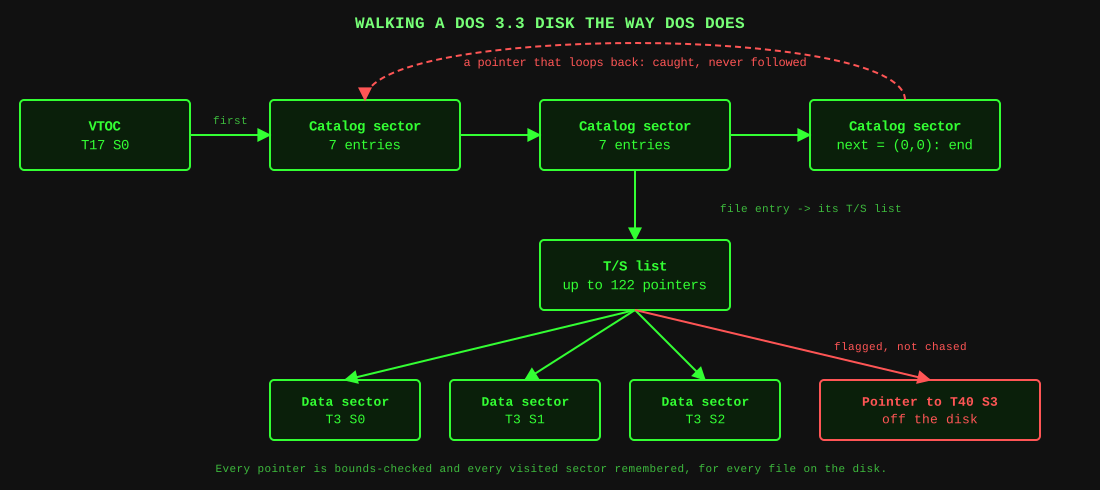
What the walk follows, and the two failures it catches along the way.
-=[ WHAT THIS CATCHES THAT A PLAIN BYTE-COMPARE DOESN'T ]=-
None of this requires a reference copy to compare against. A disk can be internally, structurally broken (a T/S list pointing off the edge of the disk, two files silently overlapping) and this pass catches it from the disk's own bytes alone, before any archive cross-check ever enters the picture later in this series.
Two sources disagree here, which is worth knowing. Apple's own DOS Manual (Appendix C) says VTOC bytes $30 to $33 are a mask for the bitmaps, while Beneath Apple DOS says $30 is the last track allocated and $31 the direction. I checked the disks in my collection: they read 22 01 00 00, 01 FF 00 00 and 12 01 00 00, a track number, a direction and two zeros, so the reverse-engineered book is right and the manual is wrong. The same manual says a file's catalog sector count is one byte that wraps to zero after 255, where the book says both bytes are stored. Either way DOS never reads the count back when loading, so the walk accepts a count that matches the real sector total modulo 256 on files over 255 sectors, instead of calling that disk damaged.
-=[ WHAT THE FILE HEADERS AND LIST OFFSETS SAY ]=-
Two more details from the book catch things the sector count can't. Applesoft and Integer BASIC files start with a 2-byte length, and binary files with a 2-byte load address then a 2-byte length. DOS reads exactly that many bytes, so a file holding fewer is cut off whatever the catalog claims, including when a cracker or a bad copy zeroed the count. The second is a field in every T/S list sector, bytes $05 and $06, which holds the file-relative sector number of its first pointer: 0 for the first list, 122 for the next, 244 after that. DOS uses it to seek in random-access text files, and sequential loading never looks at it.
Both are notes, not problems. Two real disks in my collection show why: Eamon stores its data files under the Applesoft type, and Magic Window keeps its records in a binary file, both with headers that were never program lengths. A rule that is right about programs is wrong about data wearing a program's type, so the program reports it and lets the verdict stand.
-=[ HOW A DISK GETS ITS VERDICT ]=-
Every problem the walk finds goes into one list, and that list becomes one of three verdicts. A small set of problems are hard signals that make a disk BAD: a pointer off the disk, a chain that loops or never ends, a file with a reachable sector count more than one off from its catalog's claim, a bitmap that says free for something in use (the next post), a sector claimed by two files, an image whose size isn't a known disk size, a VTOC that couldn't be fully read, a file that is entirely a repeating fill pattern (the signature of a failed read), and an image that is almost entirely blank. Anything else on the list makes the disk SUSPECT, which means "look at this," not "this is broken." No problems at all means OK. Keeping those apart is what stops a protected disk from being written off as corrupt. BAD describes the disk as read, not a final verdict: many of these, such as loops, bad pointers and a wrong bitmap, are repaired in later parts.
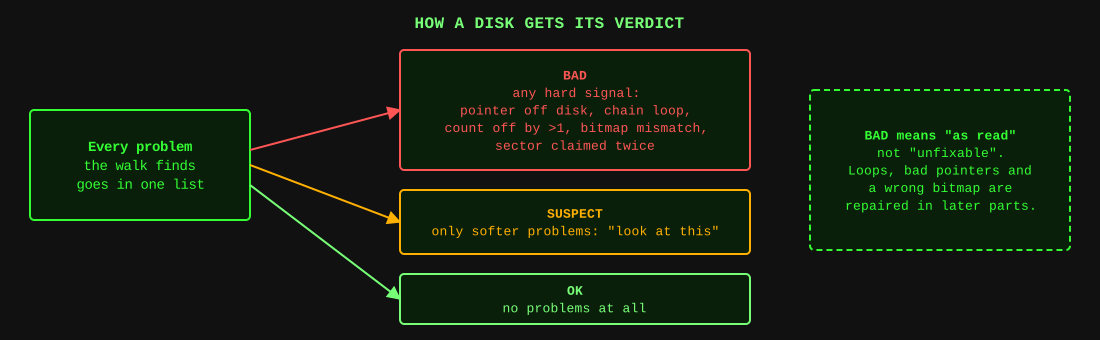
One list of problems, three verdicts.
There's one more DOS 3.3 check that deserves its own post rather than a paragraph here, because it's the single most effective thing in this whole validation pass, and it's the one almost nobody writes: cross-referencing every sector this walk found in use against DOS's own record of which sectors are allocated. That's next.
Prepare ye to plunder,
Michael Heilemann - The Norseman/The Viking